Load Balancing
Choice of Load Balancer
Flynet does not recommend any specific load balancer software. However, the chosen solution must provide back-end affinity or a "sticky" mode such that once a new session is started, a client session must have all HTTP(s) interactions with the same Jubilant server for the duration of the session. This is because the Telnet socket that must be used to communicate with the host is stateful and cannot be passed between Jubilant servers.
Organisations have successfully used Apache Software Foundation mod_proxy_balancer, HAProxy, Microsoft ARR, F5 Load Balancing and others.
Load Balance Algorithm
In most cases Flynet would recommend starting with a round-robin approach and monitoring the load on each server. A health monitor can help to ensure an even spread of the load.
Health Monitoring
The load balance should ideally be able to evaluate the status of all the possible Jubilant servers' ability to respond to a new session request.
Minimum Servers
If a load balancer allows for managing the situation where servers are "unhealthy", then it is recommended to configure it so that at least one server always responds to requests. This will ensure that users see the ‘No sessions available’ error in the Flynet terminal emulator rather than receiving an HTTP 503 error.
Example Load Balance Architecture Diagram
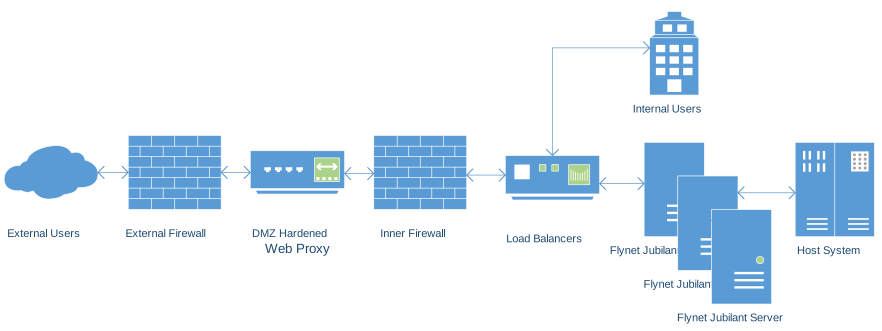
There are other examples for a private or secure publicly accessible cloud deployment.