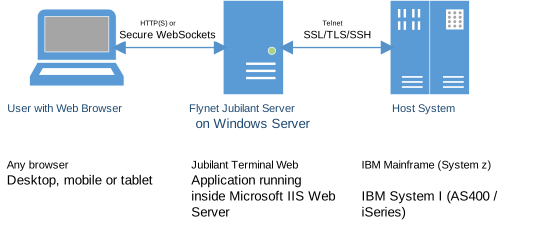
Encrypted Communication
Web Browser SSL / HTTPS
HTTPS encryption between a user's web browser and a user-facing end-point is a must. While it is possible to run Jubilant without HTTPS to the client, not only does it expose traffic to interception, web browsers disable key functionality such as the ability to copy and paste.
Depending on the chosen network configuration, the trusted SSL certificate must be installed in the server or appliance that the user is connecting to.
An organisation's network or web deployment team will most likely have favoured configuration.
Examples are:
- Users are connected directly to the server where Jubilant is installed. Therefore the Microsoft IIS web server on that server must be configured with a trusted SSL certificate.
- Users are connecting via a HTTPS load balancer. The load balancer must be configured with a trusted SSL certificate.
- Users are connecting via a TCP load balancer that directly connects the user to a server where Jubilant is installed. Therefore the Microsoft IIS web server on the Jubilant server(s) must be configured with a trusted SSL certificate.
- And are more...
Telnet over TLS to Host
Transport Layer Security (TLS) is an encryption method commonly supported by IBM Mainframe (System z) and IBM System i (iSeries/AS400) hosts that allows Jubilant to communicate with the host system over an encrypted connection.
This means that data passed between Jubilant and the host is securely encrypted.
It also allows confirmation of identity. The host (mainframe, System i etc) can present a server certificate to Jubilant to verify that it is the expected host. Jubilant can present a client certificate to help verify that the client is allowed to connect.
Basic Concept Diagram